
What good looks like after a VMware vSphere → Azure Stack HCI migration
Typical reduction vs VCF renewal for a 200-VM estate using existing Microsoft EA / CSP licences.
End-to-end for a 200-500 VM estate including pilot + phased cutover.
Per VM, using Azure Migrate or Azure Site Recovery for cross-hypervisor cutover.
Typical reduction — vCenter, VMware Update Manager, separate monitoring + backup panes all collapse into the Azure / Windows Admin Center pane.
Why UK organisations migrate from VMware vSphere to Azure Stack HCI
- ✓Avoid the Broadcom VMware uplift while staying on a strategic Microsoft stack
- ✓Native integration with Azure Arc, Azure Monitor, Microsoft Defender for Cloud
- ✓Unified identity through Entra ID across on-prem + Azure
- ✓Single skill set: your existing Windows admins already know Hyper-V + Failover Clustering
- ✓Hybrid scenarios: stretched clusters between sites, plus burst to Azure VMs at need
- ✓Reduce 5-year TCO by 20-30% vs equivalent VCF renewal
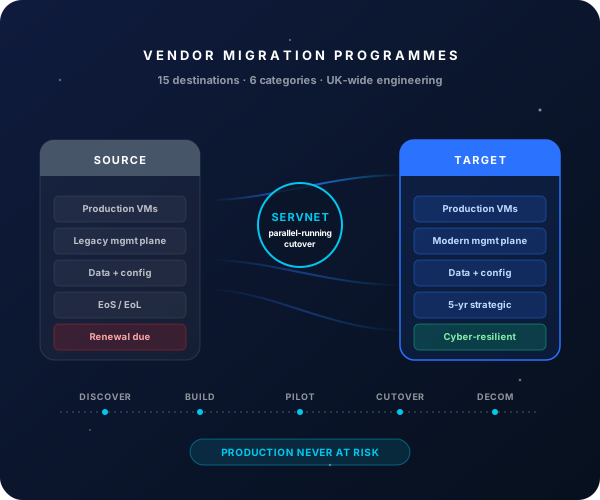
Migration phasing — typical VMware vSphere → Azure Stack HCI programme
- 1
Discovery + Azure landing-zone design
Weeks 1-4Live VMware estate fingerprint + Azure Stack HCI sizing; Azure Arc + Azure Monitor + Defender for Cloud architecture; <a href="/insights/buying-microsoft-licenses-uk-ea-vs-csp-vs-mca">Microsoft licensing</a> reconciliation.
- 2
Azure Stack HCI cluster build
Weeks 5-8Hardware delivery (Dell AX, HPE ProLiant DX, Lenovo ThinkAgile MX); Windows Admin Center deployment; cluster validation; Azure Arc onboarding; storage / network / DR design implemented.
- 3
Pilot wave (10-20 VMs)
Weeks 9-11Non-production VMs converted via Azure Migrate; functional + performance validation; operational handover with internal Windows admin team.
- 4
Phased production cutover
Weeks 12-20Workload waves grouped by app criticality; runbook per wave with cutover, rollback, validation, comms; user acceptance sign-off per wave.
- 5
VMware decommission + optimisation
Weeks 21-26Final VMs migrated; VMware licences run-off; Azure Stack HCI tuning + ongoing Arc + Defender posture optimisation.
What Servnet delivers in a VMware vSphere → Azure Stack HCI migration
Azure Migrate assessment
Free Microsoft tooling — we run + interpret the assessment so you have a sized Azure Stack HCI target before committing.
Hardware procurement
Dell PowerEdge AX, HPE ProLiant DX, Lenovo ThinkAgile MX — quoted at vendor-direct pricing.
Microsoft licensing optimisation
Azure Stack HCI is subscription-based (per-core/month, billed through Azure). We model the spend against your existing <a href="/insights/m365-licensing-optimisation">EA / CSP / MCA</a> position.
Azure Arc + Monitor + Defender setup
Full hybrid cloud posture — Arc onboarding, Azure Monitor agents, Defender for Cloud, plus the policy guardrails to stay compliant.
Backup integration
<a href="/veeam">Veeam</a> for hybrid backup, or Azure Backup if you're going fully Microsoft-native — we configure either path.
Post-migration support
90-day hypercare; optional ongoing managed services for Azure Stack HCI + Azure governance.
Top risks + how we mitigate them
Indicative: VMware → Azure Stack HCI migrations for a 200-VM estate typically run £50k-£85k professional services (excluding hardware + Microsoft subscription). Total programme cost (hardware + sub + services) usually 15-25% below an equivalent VCF renewal at year-3 break-even. Sized commercial proposal includes the 5-year TCO model against your existing VMware position.
FAQs — VMware vSphere → Azure Stack HCI
Will my Microsoft EA cover Azure Stack HCI licences?
Azure Stack HCI is billed as an Azure subscription consumption item, not a perpetual licence — it consumes Azure credits or is billed via your EA / CSP / MCA. Windows Server guest licences inside the VMs continue to consume your existing EA / CSP entitlements.
Do we need new hardware?
Yes — Azure Stack HCI requires validated nodes from Microsoft's HCI catalogue (Dell AX, HPE ProLiant DX, Lenovo ThinkAgile MX, plus others). Existing VMware hardware is typically not on the validated list, so the migration is also a hardware refresh.
Can we run a stretched cluster across two sites?
Yes — Azure Stack HCI supports stretched clusters with synchronous storage replication between metro sites. Useful as an alternative to traditional active-active SAN replication or third-party DR products.
How does this compare to Nutanix?
Both are excellent VMware destinations. Microsoft-aligned shops with heavy Azure / Entra ID / M365 stack typically prefer Azure Stack HCI for management-plane unification; non-Microsoft shops and those wanting hypervisor flexibility prefer Nutanix. See our HCI buyer's guide for the full compare.
Ready to scope your VMware vSphere → Azure Stack HCI migration?
30-minute discovery call with an engineer who's run this migration before. Honest scoping, no sales script.
Book a scoping call →