
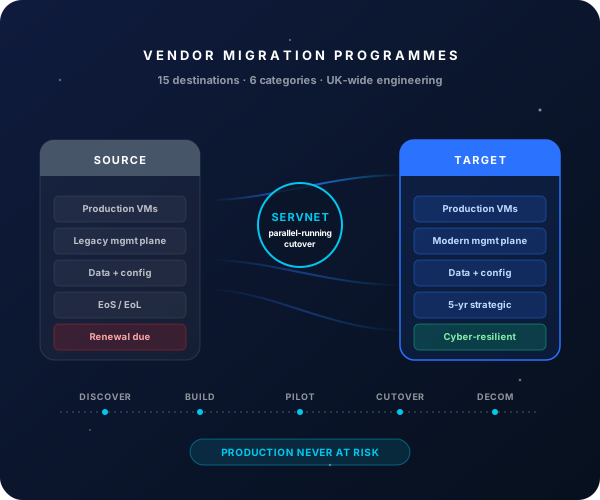
What good looks like after a On-Premises File Shares (DFS / Windows) → OneDrive + SharePoint Online migration
Servers + storage + backup + DR all decommissioned post-migration.
End-to-end for a 5-50 TB shared-drive estate.
Users access files directly from any device, anywhere, with Conditional Access enforcement.
NTFS / share-level ACLs translated to SharePoint permissions + Microsoft 365 groups.
Why UK organisations migrate from On-Premises File Shares (DFS / Windows) to OneDrive + SharePoint Online
- ✓Eliminate on-prem file server infrastructure (hardware, storage, backup, DR)
- ✓Enable secure remote / hybrid working without VPN dependency
- ✓Native Office co-authoring + Loop + Copilot integration
- ✓Microsoft Purview Sensitivity Labels + retention + e-discovery
- ✓Defender for Cloud Apps + Conditional Access for file-level data protection
- ✓Reduce IT operational time on patching, capacity, backup of legacy file servers
Migration phasing — typical On-Premises File Shares (DFS / Windows) → OneDrive + SharePoint Online programme
- 1
Discovery + SharePoint architecture
Weeks 1-3File-server estate fingerprint (size, file count, age, access patterns); DFS namespace mapping; SharePoint architecture design (hub sites, team sites, document libraries); migration tool selection (ShareGate, Quest, AvePoint, Mover).
- 2
SharePoint + OneDrive provisioning
Weeks 4-6SharePoint hub + team site templates; OneDrive sync client deployment via Intune; Sensitivity Labels + retention; Defender for Cloud Apps connector.
- 3
Pilot wave (1-2 small file shares)
Weeks 7-9Pilot shares migrated to SharePoint sites; permissions validated; user training delivered; runbook refined; user feedback gathered.
- 4
Phased migration
Weeks 10-18Share waves grouped by department / criticality; user training delivered per wave; legacy share access removed after each wave completes successfully.
- 5
File server decommission
Weeks 19-20Final shares migrated; on-prem file servers + DFS namespaces decommissioned; backup tier reclaimed.
What Servnet delivers in a On-Premises File Shares (DFS / Windows) → OneDrive + SharePoint Online migration
SharePoint + OneDrive architecture
Hub sites, team sites, communication sites + OneDrive personal storage — sized to your file-share patterns.
Migration tool licensing
ShareGate, Quest On Demand, AvePoint Fly or Microsoft Mover — licensed for the migration window.
Permissions translation
NTFS + share-level ACLs translated to SharePoint permissions; Microsoft 365 groups for ongoing manageability.
OneDrive sync deployment
Sync client deployed via Intune; Known Folder Move (Desktop, Documents, Pictures) optional per user; Files On-Demand for low-disk endpoints.
Sensitivity Labels + DLP
Auto-classification on migration; ongoing DLP policies enforced via Defender for Cloud Apps.
User training + change management
OneDrive + SharePoint training per wave; mobile + web experience walkthrough.
Top risks + how we mitigate them
Indicative: file-share → OneDrive / SharePoint migrations for a 5-50 TB estate typically run £25k-£80k professional services (excluding M365 licensing + migration tool licences). Total programme is a net saving from year 2 (on-prem infrastructure + backup costs eliminated). Talk to us for a sized commercial proposal.
FAQs — On-Premises File Shares (DFS / Windows) → OneDrive + SharePoint Online
Should we use OneDrive or SharePoint for departmental shares?
OneDrive = personal user files (My Documents, Desktop, Pictures). SharePoint = shared / departmental / project files. Both are part of the same M365 platform — we design the architecture during discovery.
What about line-of-business apps using UNC paths?
Inventoried during discovery. Options: re-point the app to a OneDrive sync local folder, keep a slim residual file server for specific UNC paths, or modernise the app to Graph API. We document the trade-off per app.
How does this compare to Azure Files / Azure Files Premium?
Azure Files retains the SMB / mapped-drive UX but moves the storage to Azure. Useful as a transitional option or for apps that genuinely need SMB. Most user-facing file shares migrate cleaner to OneDrive / SharePoint with the native collaboration features.
Can we keep some file servers on-prem?
Yes — many migrations keep a slim residual file server for specific use cases (very large files, legacy apps, regulatory requirement). Scoped honestly during discovery.
Ready to scope your On-Premises File Shares (DFS / Windows) → OneDrive + SharePoint Online migration?
30-minute discovery call with an engineer who's run this migration before. Honest scoping, no sales script.
Book a scoping call →